使用 Claude Skills 打造领域专用编码代理
当编码代理处理流行库时表现出色,但面对自定义库、新版本框架或内部 API 时却力不从心。这是因为通用代理缺乏领域专用知识。Claude Skills 通过可组合、可扩展的方式为代理提供专业知识,将通用代理转变为领域专家。
什么是 Claude Skills
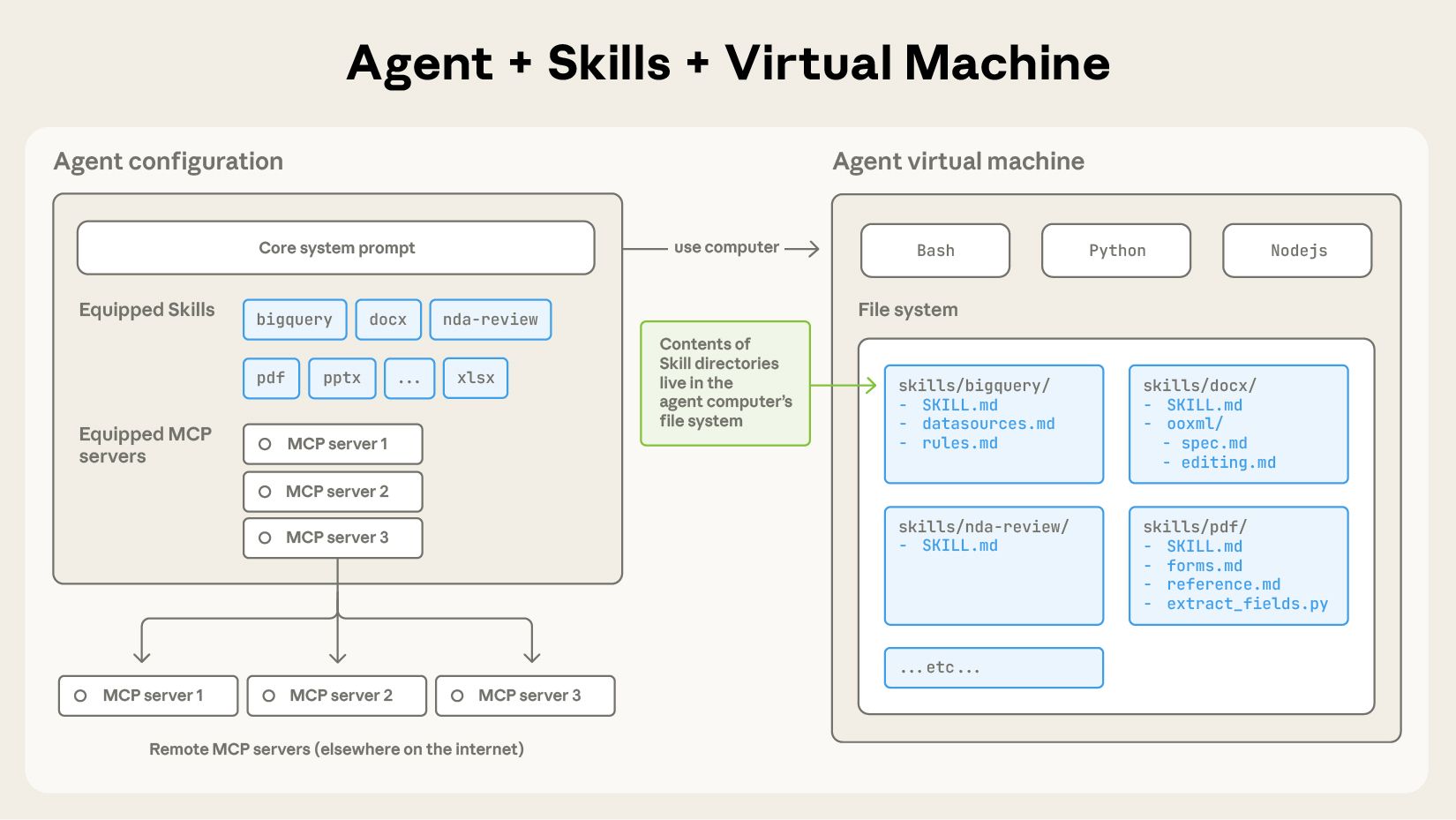
Skills 是包含 SKILL.md 文件的目录,用于为代理提供:
- 有组织的指令 - 特定任务的操作指南
- 脚本和工具 - 可执行的代码辅助
- 参考资源 - 文档、示例、最佳实践
就像为新员工准备入职指南,Skills 让你将程序性知识打包成 Claude 可重用的资源。
为什么需要 Skills
问题:上下文过载
LangChain 团队在实验中发现,直接提供完整文档(llms.txt)会导致:
- 上下文窗口快速填满 - 文档内容过多挤占可用空间
- 信息混乱 - LLM 不知道从哪里开始,什么最重要
- 性能下降 - 过多上下文反而降低代码质量
单纯的 Claude.md 虽然比文档工具好,但仍有局限:
- 单个文件难以管理大量内容
- 无法按需加载相关信息
- 缺乏模块化和可组合性
解决方案:Skills 的渐进式架构
Skills 通过三层渐进式加载解决上下文过载问题:
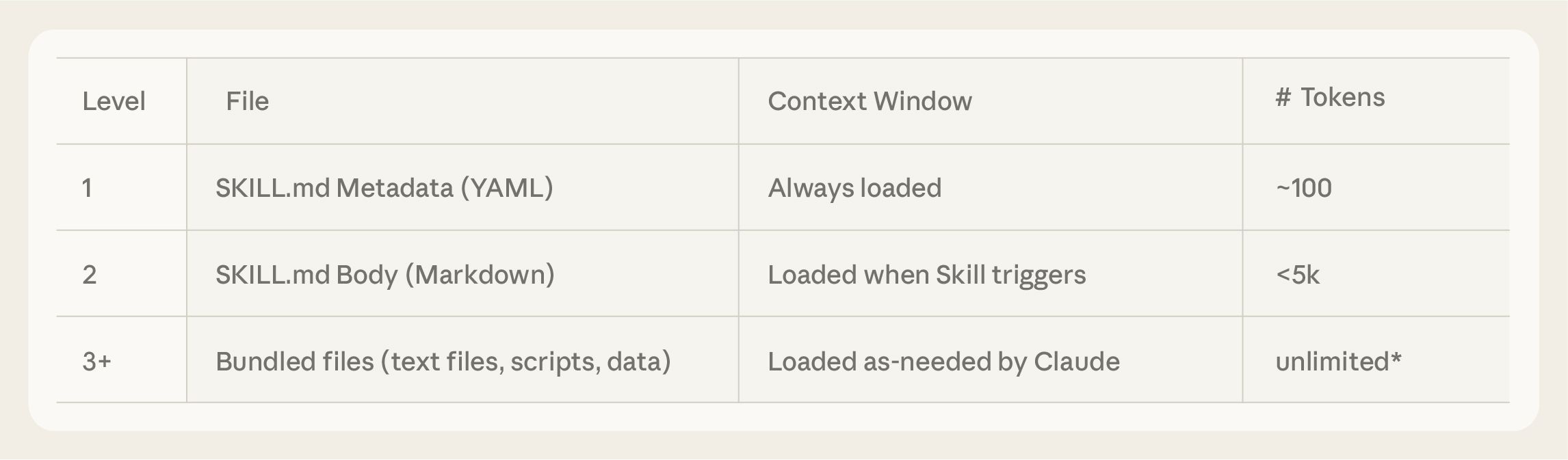
第一层 - 元数据(启动时加载)
---
name: PDF Processing
description: Tools for reading, extracting, and filling PDF forms
---
代理在启动时看到所有 Skills 的 name 和 description,知道有哪些能力可用。
第二层 - 核心指令(按需加载)
当代理判断某个 Skill 相关时,读取 SKILL.md 主体内容:
# PDF Processing Skill

## Core Capabilities
- Extract form fields from PDFs
- Fill PDF forms programmatically
- Convert PDFs to text

## Usage Patterns
When users request PDF operations:
1. Use `extract_fields.py` to list all form fields
2. Modify field values as needed
3. Save updated PDF

## Common Pitfalls
- Don't load entire PDF into context
- Use scripts for deterministic operations
- See `forms.md` for advanced form handling
第三层 - 详细资源(深度按需)
SKILL.md 可以引用其他文件,代理根据具体需求选择性读取:
skill-directory/
├── SKILL.md           # 核心指令
├── forms.md           # 表单处理详细说明
├── reference.md       # API 参考
└── scripts/
    ├── extract_fields.py
    └── fill_form.py
Claude 只在需要填写表单时才读取 forms.md,避免不必要的上下文消耗。
快速开始:最小可行 SKILL.md
基础模板
---
name: Your Skill Name
description: Brief description of what this skill provides (1-2 sentences)
---

# [Skill Name]

## When to Use This Skill
Describe the scenarios where this skill is relevant.

## Core Concepts
Key concepts agents need to understand.

## Common Patterns
Code examples or workflows for typical use cases.

## Pitfalls to Avoid
Common mistakes and how to prevent them.

## Further Reading
- Link to detailed docs
- Reference to related files in this skill
实战示例:LangGraph Skill
---
name: LangGraph Development
description: Build stateful, multi-agent systems with LangGraph framework
---

# LangGraph Development Skill

## When to Use This Skill
Use when building agents with:
- Multi-step workflows with state management
- Human-in-the-loop interactions
- Parallel agent execution
- Persistent conversation memory

## Core Patterns

### Basic Agent Structure
```python
from langgraph.graph import StateGraph, END

def create_agent(state):
    workflow = StateGraph(AgentState)
    workflow.add_node("process", process_node)
    workflow.add_edge("process", END)
    return workflow.compile()
State Management
Always define state schema explicitly:
from typing import TypedDict

class AgentState(TypedDict):
    messages: list
    context: dict
Common Pitfalls
❌ Incorrect interrupt() usage
# Wrong: interrupt without proper context
workflow.add_node("ask", lambda s: interrupt())
✓ Correct interrupt pattern
def human_feedback_node(state):
    user_input = interrupt("Please review the plan")
    state["approved"] = user_input
    return state
❌ Wrong state updates
# Wrong: Mutating state directly
state["messages"].append(new_msg)
✓ Correct state updates
# Correct: Return new state
return {"messages": state["messages"] + [new_msg]}
Detailed References
- See
async-patterns.mdfor async/await with LangGraph - See
deployment.mdfor LangGraph Cloud deployment - Official docs: https://langchain-ai.github.io/langgraph/
## 从 Claude.md 迁移到 Skills

如果你已经在使用 `Claude.md`,可以分四个阶段迁移到 Skills:

### 阶段 1:创建基础 SKILL.md

将现有 `Claude.md` 的核心内容提取到 `SKILL.md`:

```bash
mkdir -p ~/.config/claude/skills/my-project
cd ~/.config/claude/skills/my-project

# 创建 SKILL.md,包含 Claude.md 的精华部分
原则:
- 保留最常用的 20% 内容
- 移除过于具体的项目细节
- 聚焦可重用的模式和原则
阶段 2:提取详细参考
将长篇内容拆分到独立文件:
my-project-skill/
├── SKILL.md              # 核心指南(保持精简)
├── api-reference.md      # API 详细文档
├── architecture.md       # 架构设计文档
└── troubleshooting.md    # 问题排查指南
在 SKILL.md 中引用:
## Advanced Topics
For detailed API reference, see `api-reference.md`
For architecture patterns, see `architecture.md`
阶段 3:添加可执行脚本
识别重复性任务,编写脚本:
# scripts/setup_dev_env.py
"""Setup development environment with dependencies"""

def setup():
    # Install dependencies
    # Configure environment
    # Verify setup
    pass
在 SKILL.md 中说明:
## Development Setup
Run `scripts/setup_dev_env.py` to configure your environment.
阶段 4:准备资产文件
添加示例、模板、配置:
my-project-skill/
├── SKILL.md
├── templates/
│   ├── component.template.tsx
│   └── test.template.ts
└── examples/
    ├── basic-usage.md
    └── advanced-patterns.md
最佳实践
1. 从评估开始
在代表性任务上测试代理,观察它在哪里遇到困难:
# 评估检查清单
- [ ] 代理是否理解核心概念?
- [ ] 是否频繁出现相同错误?
- [ ] 是否需要额外上下文才能完成任务?
- [ ] 哪些文档被反复查询?
针对性地构建 Skills 来填补这些差距。
2. 为规模化设计结构
何时拆分文件:
SKILL.md超过 300 行- 包含互斥的上下文(如 Web vs Mobile)
- 某些内容很少被使用
如何组织:
skill/
├── SKILL.md           # 入口,200-300 行
├── web/
│   ├── react.md
│   └── vue.md
├── mobile/
│   ├── ios.md
│   └── android.md
└── common/
    └── api-patterns.md
3. 监控调用模式
在实际使用中观察 Claude 如何使用 Skill:
# 监控要点
- Claude 是否读取了正确的文件?
- 是否过度依赖某些上下文?
- 是否忽略了重要信息?
- `name` 和 `description` 是否准确触发 Skill?
根据观察迭代优化。
4. 与 Claude 一起迭代
让 Claude 帮助改进 Skill:
提示词示例:
我刚刚用你完成了一个 [任务]。请分析:
1. 哪些步骤重复出现,可以标准化?
2. 你遇到了哪些常见错误?
3. 哪些上下文最有用?
4. 如何改进这个 SKILL.md 让类似任务更高效?

请将建议以 SKILL.md 格式输出。
5. 简洁性检查
定期审查 Skill 保持精简:
# 简洁性检查清单
- [ ] SKILL.md 核心内容 < 300 行
- [ ] 每个概念有清晰示例
- [ ] 移除过时或重复内容
- [ ] 常见陷阱有具体解决方案
- [ ] 链接到详细文档而非全部复制
Skills vs Claude.md vs MCP
| 特性 | Claude.md | MCP | Skills |
|---|---|---|---|
| 范围 | 单个项目 | 外部数据源 | 可重用能力 |
| 加载方式 | 一次性全量 | 工具调用 | 渐进式按需 |
| 可组合性 | 低 | 中 | 高 |
| 上下文效率 | 低(全部加载) | 中(按需但粗粒度) | 高(三层渐进) |
| 可移植性 | 仅限项目 | 跨项目但需服务器 | 跨项目可分享 |
| 最佳用途 | 项目级配置 | 访问外部 API/数据 | 领域知识打包 |
组合使用
最佳实践是三者结合:
项目结构:
├── CLAUDE.md           # 项目特定配置
├── mcp-config.json     # 外部数据源(API keys, endpoints)
└── ~/.config/claude/skills/
    ├── langgraph/      # 框架知识
    ├── react/          # UI 框架
    └── testing/        # 测试模式
Claude.md: “这个项目使用 Next.js + LangGraph,测试用 Vitest”
MCP: 提供访问内部 API 文档、数据库的工具
Skills: LangGraph 开发模式、React 最佳实践、Vitest 测试技巧
LangChain 的实验结论
LangChain 团队在实验中对比了四种配置:
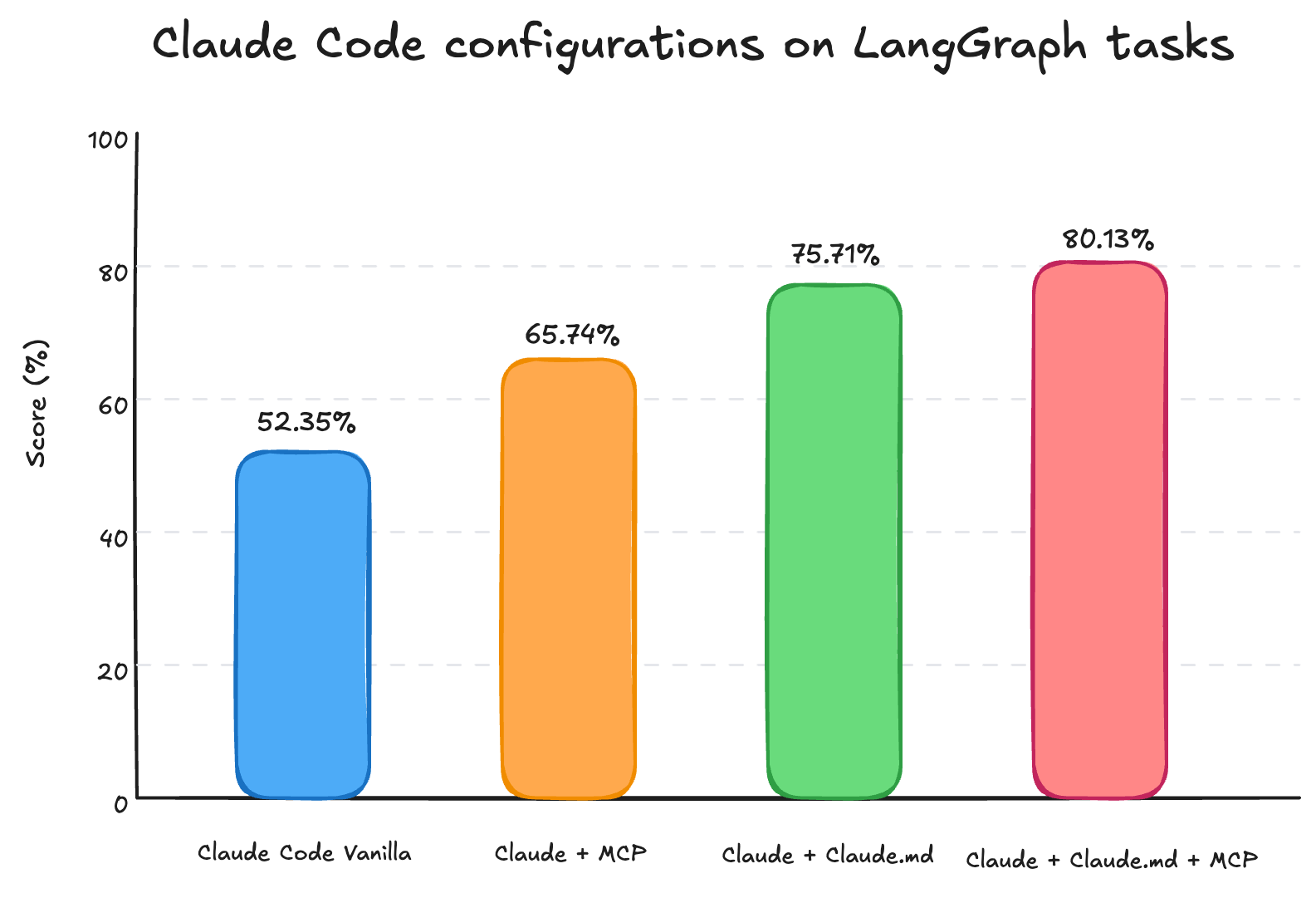
关键发现:
-
Claude.md > MCP 单独使用
精简的结构化指南优于单纯的文档访问工具 -
Claude.md + MCP = 最佳
基础知识(Claude.md) + 深度参考(MCP) 效果最好 -
上下文过载是真实问题
Claude + MCP 触发上下文窗口警告,成本高 2.5 倍
Skills 如何改进这些问题:
- 渐进式加载 - 避免上下文过载
- 模块化 - 比单一 Claude.md 更易维护
- 可重用 - 跨项目分享知识
- 与 MCP 协同 - Skills 提供导航,MCP 提供数据
生态系统资源
官方 Skills 示例
访问 Anthropic Skills 仓库 获取:
- document-skills/pdf - PDF 处理
- web-skills/scraping - 网页抓取
- data-skills/analysis - 数据分析
平台支持
Skills 已支持:
学习资源
- 官方文档: https://docs.claude.com/en/docs/agents-and-tools/agent-skills/overview
- Cookbook: https://github.com/anthropics/claude-cookbooks/tree/main/skills
- Skills 公告: https://www.anthropic.com/news/skills
开始构建你的第一个 Skill
5 分钟快速开始
# 1. 创建 Skill 目录
mkdir -p ~/.config/claude/skills/my-first-skill
cd ~/.config/claude/skills/my-first-skill

# 2. 创建 SKILL.md
cat > SKILL.md << 'EOF'
---
name: My First Skill
description: Template for building custom skills
---

# My First Skill

## When to Use
Describe when this skill is relevant.

## Quick Start
Basic usage example.

## Common Patterns
Reusable code patterns.
EOF

# 3. 在 Claude 中测试
# 启动 Claude Code 或 Claude.ai,Skills 会自动加载
下一步
- 识别痛点 - 观察代理在哪里重复失败
- 提炼知识 - 将解决方案提取为可重用模式
- 测试迭代 - 在真实任务中验证 Skill
- 分享贡献 - 将通用 Skills 贡献给社区
总结
Claude Skills 通过渐进式上下文加载解决了领域专用代理的核心挑战:
核心优势:
- ✓ 避免上下文过载
- ✓ 模块化可组合
- ✓ 跨项目可重用
- ✓ 与 MCP 协同工作
最佳实践:
- 从最小可行 Skill 开始
- 基于实际问题迭代
- 保持核心内容精简
- 详细内容按需拆分
结论: 不是工具越多越好,而是正确的上下文在正确的时间出现。Skills 让 Claude 像经验丰富的工程师一样,知道何时查阅哪份文档,而不是一次性记住所有内容。
相关阅读: