在 Claude 开发者平台上引入高级工具的使用
原文 Introducing advanced tool use on the Claude Developer Platform \ Anthropic
AI Agent 的未来是模型能够无缝地跨越数百或数千个工具协同工作。一个 IDE 助手集成了 git 操作、文件操作、包管理器、测试框架和部署 pipeline。一个运维协调器同时连接 Slack、GitHub、Google Drive、Jira、公司数据库以及数十个 MCP server。
为了构建高效的 Agent,它们需要能够处理无限的工具库,而无需预先将所有定义塞入 context。我们关于使用 MCP 进行代码执行的博客文章讨论了工具结果和定义有时会在 Agent 读取请求之前消耗 50,000+ token。Agent 应该按需发现和加载工具,只保留与当前任务相关的内容。
Agent 还需要能够从代码中调用工具。当使用自然语言工具调用时,每次调用都需要完整的推理过程,中间结果会堆积在 context 中,无论它们是否有用。代码天然适合编排逻辑,例如循环、条件判断和数据转换。Agent 需要根据手头的任务灵活选择代码执行或推理。
Agent 还需要从示例中学习正确的工具使用方式,而不仅仅是 schema 定义。JSON schema 定义了什么在结构上是有效的,但无法表达使用模式:何时包含可选参数、哪些组合有意义,或者你的 API 期望什么约定。
今天,我们发布了三个功能来实现这一点:
- Tool Search Tool,允许 Claude 使用搜索工具访问数千个工具而不消耗其 context window
- Programmatic Tool Calling,允许 Claude 在代码执行环境中调用工具,减少对模型 context window 的影响
- Tool Use Examples,为演示如何有效使用给定工具提供了通用标准
在内部测试中,我们发现这些功能帮助我们构建了使用传统工具使用模式无法实现的东西。例如,Claude for Excel 使用 Programmatic Tool Calling 读取和修改包含数千行的电子表格,而不会使模型的 context window 过载。
根据我们的经验,我们相信这些功能为你可以使用 Claude 构建的内容开辟了新的可能性。
Tool Search Tool
挑战
MCP 工具定义提供了重要的 context,但随着更多 server 连接,这些 token 会累积。考虑一个五服务器设置:
- GitHub: 35 个工具 (~26K token)
- Slack: 11 个工具 (~21K token)
- Sentry: 5 个工具 (~3K token)
- Grafana: 5 个工具 (~3K token)
- Splunk: 2 个工具 (~2K token)
那就是 58 个工具在对话甚至开始之前就消耗了大约 55K token。添加更多 server,如 Jira(仅其一项就使用 ~17K token),你很快就会接近 100K+ token 开销。在 Anthropic,我们看到工具定义在优化之前消耗了 134K token。
但 token 成本不是唯一的问题。最常见的失败是错误的工具选择和不正确的参数,尤其是当工具具有相似名称时,例如 notification-send-user 与 notification-send-channel。
我们的解决方案
Tool Search Tool 不是预先加载所有工具定义,而是按需发现工具。Claude 只看到它实际需要用于当前任务的工具。
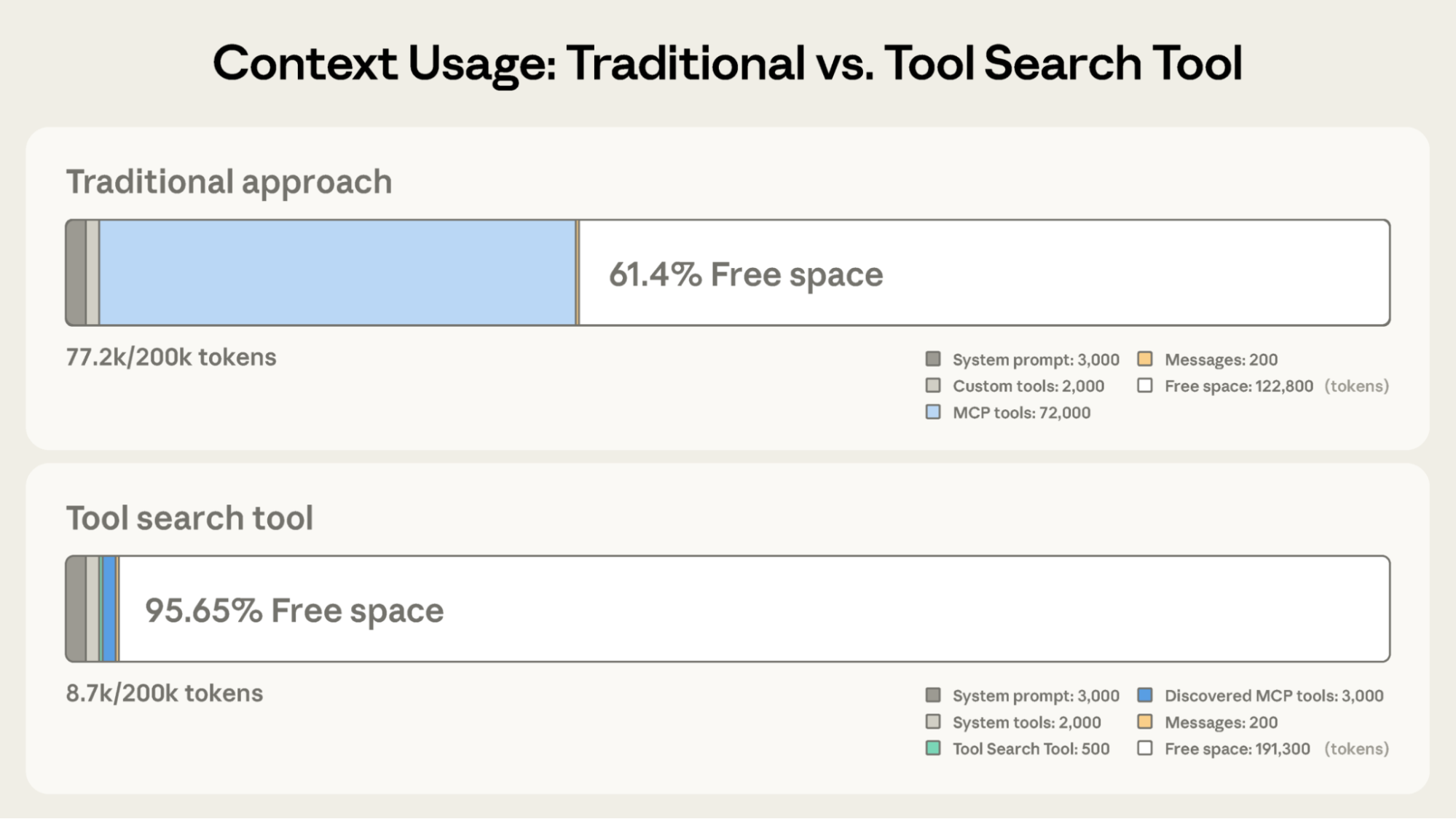
与 Claude 的传统方法相比,Tool Search Tool 节省了 191,300 token 的 context(传统方法为 122,800)
传统方法:
- 所有工具定义预先加载 (~72K token,50+ 个 MCP 工具)
- 对话历史和 system prompt 争夺剩余空间
- 总 context 消耗:在任何工作开始之前约 ~77K token
使用 Tool Search Tool:
- 仅预先加载 Tool Search Tool (~500 token)
- 根据需要按需发现工具 (3-5 个相关工具,~3K token)
- 总 context 消耗:~8.7K token,保留 95% 的 context window
这代表 token 使用减少了 85%,同时保持对完整工具库的访问。内部测试显示,在处理大型工具库时,MCP 评估的准确性显著提高。启用 Tool Search Tool 后,Opus 4 从 49% 提高到 74%,Opus 4.5 从 79.5% 提高到 88.1%。
Tool Search Tool 如何工作
Tool Search Tool 让 Claude 动态发现工具,而不是预先加载所有定义。你向 API 提供所有工具定义,但使用 defer_loading: true 标记工具以使其可按需发现。延迟的工具最初不会加载到 Claude 的 context 中。Claude 只看到 Tool Search Tool 本身以及任何带有 defer_loading: false 的工具(你最关键、最常用的工具)。
当 Claude 需要特定功能时,它会搜索相关工具。Tool Search Tool 返回对匹配工具的引用,这些引用会扩展为 Claude context 中的完整定义。
例如,如果 Claude 需要与 GitHub 交互,它会搜索 “github”,只有 github.createPullRequest 和 github.listIssues 被加载——而不是你来自 Slack、Jira 和 Google Drive 的其他 50+ 个工具。
这样,Claude 可以访问你的完整工具库,同时只为它实际需要的工具支付 token 成本。
Prompt caching 注意事项: Tool Search Tool 不会破坏 prompt caching,因为延迟工具完全从初始 prompt 中排除。它们只在 Claude 搜索它们后添加到 context 中,因此你的 system prompt 和核心工具定义保持可缓存。
实现:
{
  "tools": [
    // 包含一个工具搜索工具 (regex、BM25 或自定义)
    {"type": "tool_search_tool_regex_20251119", "name": "tool_search_tool_regex"},

    // 标记工具以按需发现
    {
      "name": "github.createPullRequest",
      "description": "Create a pull request",
      "input_schema": {...},
      "defer_loading": true
    }
    // ... 数百个具有 defer_loading: true 的延迟工具
  ]
}
对于 MCP server,你可以延迟加载整个 server,同时保持特定的高使用率工具加载:
{
  "type": "mcp_toolset",
  "mcp_server_name": "google-drive",
  "default_config": {"defer_loading": true}, // 延迟加载整个 server
  "configs": {
    "search_files": {
      "defer_loading": false
    }  // 保持最常用的工具加载
  }
}
Claude Developer Platform 开箱即用地提供基于 regex 和 BM25 的搜索工具,但你也可以使用 embedding 或其他策略实现自定义搜索工具。
何时使用 Tool Search Tool
像任何架构决策一样,启用 Tool Search Tool 涉及权衡。该功能在工具调用之前添加了搜索步骤,因此当 context 节省和准确性改进超过额外延迟时,它提供最佳 ROI。
使用场景:
- 工具定义消耗 >10K token
- 遇到工具选择准确性问题
- 构建具有多个 server 的 MCP 驱动系统
- 可用工具 ≥10 个
收益较少的场景:
- 小型工具库 (<10 个工具)
- 所有工具在每次会话中频繁使用
- 工具定义紧凑
Programmatic Tool Calling
挑战
随着工作流变得更加复杂,传统工具调用会产生两个基本问题:
- 中间结果造成的 context 污染:当 Claude 分析 10MB 日志文件以查找错误模式时,整个文件进入其 context window,即使 Claude 只需要错误频率的摘要。当跨多个表获取客户数据时,无论相关性如何,每条记录都会在 context 中累积。这些中间结果消耗了大量 token 预算,并可能将重要信息完全推出 context window。
- 推理开销和手动综合:每次工具调用都需要完整的模型推理过程。在收到结果后,Claude 必须”目测”数据以提取相关信息,推理各部分如何组合在一起,并决定下一步做什么——所有这些都通过自然语言处理。一个五工具工作流意味着五次推理过程加上 Claude 解析每个结果、比较值和综合结论。这既慢又容易出错。
我们的解决方案
Programmatic Tool Calling 使 Claude 能够通过代码而不是通过单独的 API 往返来编排工具。Claude 不是一次请求一个工具并将每个结果返回到其 context,而是编写调用多个工具、处理其输出并控制哪些信息实际进入其 context window 的代码。
Claude 擅长编写代码,通过让它用 Python 而不是通过自然语言工具调用来表达编排逻辑,你可以获得更可靠、更精确的控制流。循环、条件、数据转换和错误处理都在代码中明确,而不是在 Claude 的推理中隐含。
示例:预算合规检查
考虑一个常见的业务任务:“哪些团队成员超出了他们的第三季度差旅预算?”
你有三个可用工具:
get_team_members(department)- 返回带有 ID 和级别的团队成员列表get_expenses(user_id, quarter)- 返回用户的费用行项目get_budget_by_level(level)- 返回员工级别的预算限制
传统方法:
- 获取团队成员 → 20 人
- 对于每个人,获取他们的第三季度费用 → 20 次工具调用,每次返回 50-100 个行项目(航班、酒店、餐饮、收据)
- 按员工级别获取预算限制
- 所有这些都进入 Claude 的 context:2,000+ 费用行项目 (50 KB+)
- Claude 手动汇总每个人的费用,查找他们的预算,将费用与预算限制进行比较
- 更多往返模型的过程,大量 context 消耗
使用 Programmatic Tool Calling:
每个工具结果不是返回到 Claude,而是 Claude 编写一个编排整个工作流的 Python 脚本。该脚本在 Code Execution 工具(沙盒环境)中运行,当它需要来自你的工具的结果时暂停。当你通过 API 返回工具结果时,它们由脚本处理而不是被模型消耗。脚本继续执行,Claude 只看到最终输出。
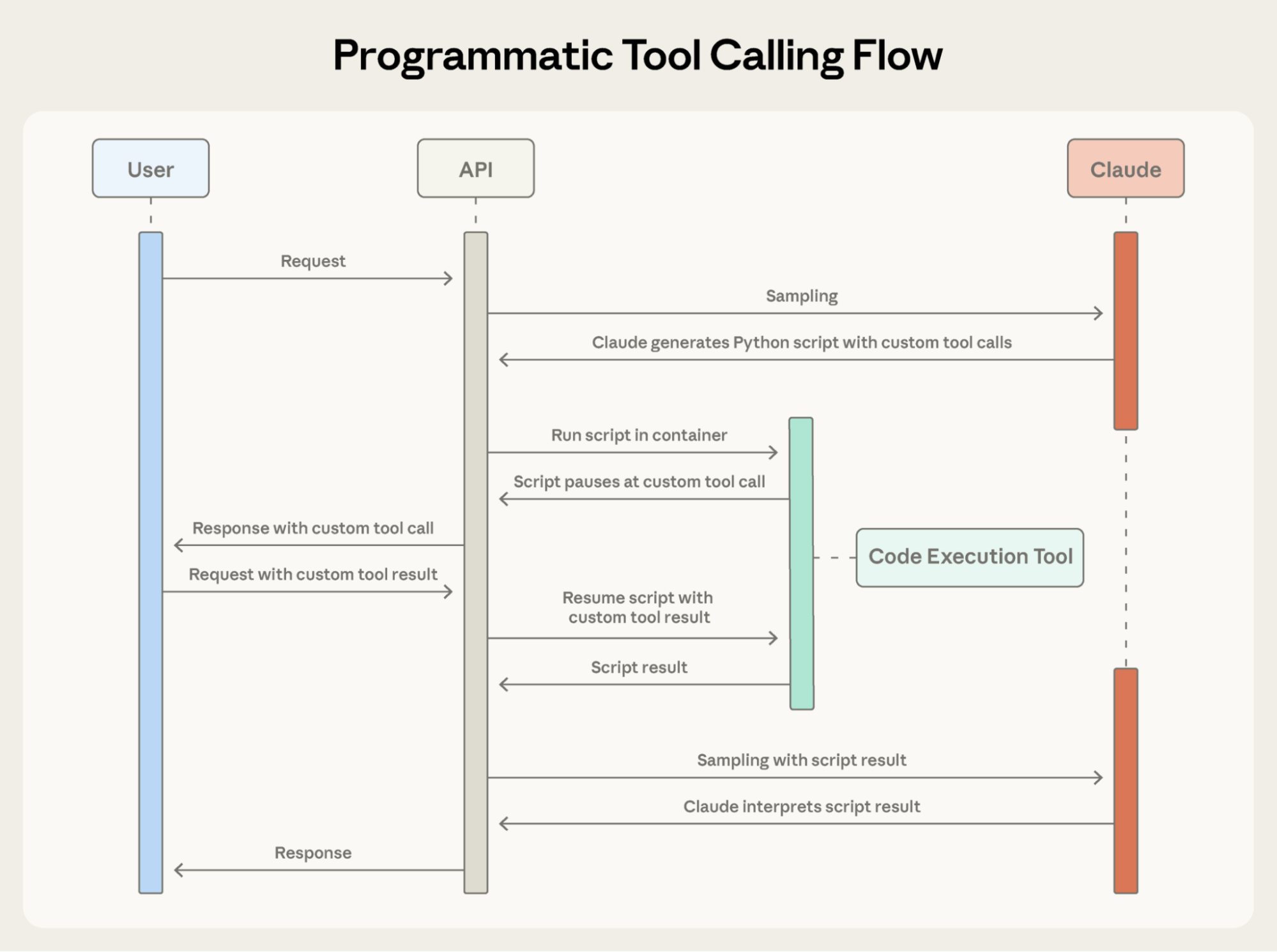
Programmatic Tool Calling 使 Claude 能够通过代码而不是通过单独的 API 往返来编排工具,允许并行工具执行。
以下是 Claude 为预算合规任务编写的编排代码:
team = await get_team_members("engineering")

# 为每个唯一级别获取预算
levels = list(set(m["level"] for m in team))
budget_results = await asyncio.gather(*[
    get_budget_by_level(level) for level in levels
])

# 创建查找字典: {"junior": budget1, "senior": budget2, ...}
budgets = {level: budget for level, budget in zip(levels, budget_results)}

# 并行获取所有费用
expenses = await asyncio.gather(*[
    get_expenses(m["id"], "Q3") for m in team
])

# 查找超出差旅预算的员工
exceeded = []
for member, exp in zip(team, expenses):
    budget = budgets[member["level"]]
    total = sum(e["amount"] for e in exp)
    if total > budget["travel_limit"]:
        exceeded.append({
            "name": member["name"],
            "spent": total,
            "limit": budget["travel_limit"]
        })

print(json.dumps(exceeded))
Claude 的 context 只接收最终结果:超出预算的两三个人。2,000+ 行项目、中间总和和预算查找不会影响 Claude 的 context,将消耗从 200KB 原始费用数据减少到仅 1KB 结果。
效率提升是显著的:
- Token 节省:通过将中间结果保留在 Claude 的 context 之外,PTC 显著减少了 token 消耗。在复杂的研究任务上,平均使用量从 43,588 降至 27,297 token,减少了 37%。
- 减少延迟:每次 API 往返都需要模型推理(数百毫秒到秒)。当 Claude 在单个代码块中编排 20+ 次工具调用时,你消除了 19+ 次推理过程。API 处理工具执行而无需每次都返回模型。
- 提高准确性:通过编写明确的编排逻辑,Claude 比在自然语言中处理多个工具结果时犯的错误更少。内部知识检索从 25.6% 提高到 28.5%;GIA 基准测试从 46.5% 提高到 51.2%。
生产工作流涉及混乱的数据、条件逻辑和需要扩展的操作。Programmatic Tool Calling 让 Claude 以编程方式处理这种复杂性,同时将其重点放在可操作的结果上,而不是原始数据处理上。
Programmatic Tool Calling 如何工作
1. 标记工具为可从代码调用
将 code_execution 添加到工具中,并设置 allowed_callers 以选择加入程序化执行的工具:
{
  "tools": [
    {
      "type": "code_execution_20250825",
      "name": "code_execution"
    },
    {
      "name": "get_team_members",
      "description": "Get all members of a department...",
      "input_schema": {...},
      "allowed_callers": ["code_execution_20250825"] // 选择加入 programmatic tool calling
    },
    {
      "name": "get_expenses",
      ...
    },
    {
      "name": "get_budget_by_level",
      ...
    }
  ]
}
API 将这些工具定义转换为 Claude 可以调用的 Python 函数。
2. Claude 编写编排代码
Claude 不是一次请求一个工具,而是生成 Python 代码:
{
  "type": "server_tool_use",
  "id": "srvtoolu_abc",
  "name": "code_execution",
  "input": {
    "code": "team = get_team_members('engineering')\n..." // 上面的代码示例
  }
}
3. 工具执行而不命中 Claude 的 context
当代码调用 get_expenses() 时,你会收到一个带有 caller 字段的工具请求:
{
  "type": "tool_use",
  "id": "toolu_xyz",
  "name": "get_expenses",
  "input": {"user_id": "emp_123", "quarter": "Q3"},
  "caller": {
    "type": "code_execution_20250825",
    "tool_id": "srvtoolu_abc"
  }
}
你提供结果,该结果在 Code Execution 环境中处理,而不是在 Claude 的 context 中。对于代码中的每次工具调用,此请求-响应周期重复。
4. 仅最终输出进入 context
当代码运行完成时,只有代码的结果返回到 Claude:
{
  "type": "code_execution_tool_result",
  "tool_use_id": "srvtoolu_abc",
  "content": {
    "stdout": "[{\"name\": \"Alice\", \"spent\": 12500, \"limit\": 10000}...]"
  }
}
这就是 Claude 看到的全部,而不是沿途处理的 2000+ 费用行项目。
何时使用 Programmatic Tool Calling
Programmatic Tool Calling 在你的工作流中添加了一个代码执行步骤。当 token 节省、延迟改进和准确性提升显著时,这种额外开销是值得的。
最有益的场景:
- 处理大型数据集,其中你只需要聚合或摘要
- 运行具有三个或更多依赖工具调用的多步骤工作流
- 在 Claude 看到工具结果之前过滤、排序或转换工具结果
- 处理中间数据不应影响 Claude 推理的任务
- 跨多个项目运行并行操作(例如,检查 50 个 endpoint)
收益较少的场景:
- 进行简单的单工具调用
- 处理 Claude 应该看到并推理所有中间结果的任务
- 运行具有小响应的快速查找
Tool Use Examples
挑战
JSON Schema 擅长定义结构——类型、必需字段、允许的枚举——但它无法表达使用模式:何时包含可选参数、哪些组合有意义,或者你的 API 期望什么约定。
考虑一个支持工单 API:
{
  "name": "create_ticket",
  "input_schema": {
    "properties": {
      "title": {"type": "string"},
      "priority": {"enum": ["low", "medium", "high", "critical"]},
      "labels": {"type": "array", "items": {"type": "string"}},
      "reporter": {
        "type": "object",
        "properties": {
          "id": {"type": "string"},
          "name": {"type": "string"},
          "contact": {
            "type": "object",
            "properties": {
              "email": {"type": "string"},
              "phone": {"type": "string"}
            }
          }
        }
      },
      "due_date": {"type": "string"},
      "escalation": {
        "type": "object",
        "properties": {
          "level": {"type": "integer"},
          "notify_manager": {"type": "boolean"},
          "sla_hours": {"type": "integer"}
        }
      }
    },
    "required": ["title"]
  }
}
Schema 定义了什么是有效的,但留下了关键问题未回答:
- 格式歧义:
due_date应该使用 “2024-11-06”、“Nov 6, 2024” 还是 “2024-11-06T00:00:00Z”? - ID 约定:
reporter.id是 UUID、“USR-12345” 还是只是 “12345”? - 嵌套结构使用: Claude 应该何时填充
reporter.contact? - 参数相关性:
escalation.level和escalation.sla_hours如何与 priority 相关?
这些歧义可能导致格式错误的工具调用和不一致的参数使用。
我们的解决方案
Tool Use Examples 让你直接在工具定义中提供示例工具调用。你不是仅依赖 schema,而是向 Claude 展示具体的使用模式:
{
    "name": "create_ticket",
    "input_schema": { /* 与上面相同的 schema */ },
    "input_examples": [
      {
        "title": "Login page returns 500 error",
        "priority": "critical",
        "labels": ["bug", "authentication", "production"],
        "reporter": {
          "id": "USR-12345",
          "name": "Jane Smith",
          "contact": {
            "email": "jane@acme.com",
            "phone": "+1-555-0123"
          }
        },
        "due_date": "2024-11-06",
        "escalation": {
          "level": 2,
          "notify_manager": true,
          "sla_hours": 4
        }
      },
      {
        "title": "Add dark mode support",
        "labels": ["feature-request", "ui"],
        "reporter": {
          "id": "USR-67890",
          "name": "Alex Chen"
        }
      },
      {
        "title": "Update API documentation"
      }
    ]
  }
从这三个示例中,Claude 学习:
- 格式约定:日期使用 YYYY-MM-DD,用户 ID 遵循 USR-XXXXX,label 使用 kebab-case
- 嵌套结构模式:如何使用其嵌套的 contact 对象构造 reporter 对象
- 可选参数相关性:关键错误具有完整的联系信息 + 具有紧 SLA 的 escalation;功能请求具有 reporter 但没有 contact/escalation;内部任务仅具有 title
在我们自己的内部测试中,Tool Use Examples 将复杂参数处理的准确性从 72% 提高到 90%。
何时使用 Tool Use Examples
Tool Use Examples 向你的工具定义添加 token,因此当准确性改进超过额外成本时,它们最有价值。
最有益的场景:
- 复杂的嵌套结构,其中有效的 JSON 并不意味着正确的使用
- 具有许多可选参数且包含模式很重要的工具
- 具有 schema 中未捕获的特定领域约定的 API
- 相似的工具,其中示例阐明使用哪个工具(例如,
create_ticket与create_incident)
收益较少的场景:
- 具有明显使用的简单单参数工具
- Claude 已经理解的标准格式,如 URL 或电子邮件
- 更好地由 JSON Schema 约束处理的验证问题
最佳实践
构建采取实际行动的 Agent 意味着同时处理规模、复杂性和精度。这三个功能协同工作以解决工具使用工作流中的不同瓶颈。以下是如何有效地组合它们。
战略性地分层功能
并非每个 Agent 都需要为给定任务使用所有三个功能。从你最大的瓶颈开始:
- 工具定义导致的 context 膨胀 → Tool Search Tool
- 污染 context 的大型中间结果 → Programmatic Tool Calling
- 参数错误和格式错误的调用 → Tool Use Examples
这种专注的方法让你解决限制 Agent 性能的特定约束,而不是预先添加复杂性。
然后根据需要分层添加其他功能。它们是互补的:Tool Search Tool 确保找到正确的工具,Programmatic Tool Calling 确保高效执行,Tool Use Examples 确保正确调用。
设置 Tool Search Tool 以实现更好的发现
工具搜索与名称和描述匹配,因此清晰、描述性的定义可以提高发现准确性。
// 好
{
    "name": "search_customer_orders",
    "description": "Search for customer orders by date range, status, or total amount. Returns order details including items, shipping, and payment info."
}

// 不好
{
    "name": "query_db_orders",
    "description": "Execute order query"
}
添加 system prompt 指导,以便 Claude 知道可用的内容:
You have access to tools for Slack messaging, Google Drive file management,
Jira ticket tracking, and GitHub repository operations. Use the tool search
to find specific capabilities.
始终加载你最常用的三到五个工具,延迟其余工具。这平衡了常见操作的即时访问与其他所有内容的按需发现。
设置 Programmatic Tool Calling 以实现正确执行
由于 Claude 编写代码来解析工具输出,因此清晰地记录返回格式。这有助于 Claude 编写正确的解析逻辑:
{
    "name": "get_orders",
    "description": "Retrieve orders for a customer.
Returns:
    List of order objects, each containing:
    - id (str): Order identifier
    - total (float): Order total in USD
    - status (str): One of 'pending', 'shipped', 'delivered'
    - items (list): Array of {sku, quantity, price}
    - created_at (str): ISO 8601 timestamp"
}
查看下面受益于程序化编排的选择加入工具:
- 可以并行运行的工具(独立操作)
- 安全重试的操作(幂等)
设置 Tool Use Examples 以实现参数准确性
为行为清晰度制作示例:
- 使用真实数据(真实城市名称、合理价格,而不是 “string” 或 “value”)
- 显示具有最小、部分和完整规范模式的多样性
- 保持简洁:每个工具 1-5 个示例
- 专注于歧义(仅在从 schema 中不明显正确使用的地方添加示例)
入门
这些功能处于 beta 阶段。要启用它们,请添加 beta header 并包含你需要的工具:
client.beta.messages.create(
    betas=["advanced-tool-use-2025-11-20"],
    model="claude-sonnet-4-5-20250929",
    max_tokens=4096,
    tools=[
        {"type": "tool_search_tool_regex_20251119", "name": "tool_search_tool_regex"},
        {"type": "code_execution_20250825", "name": "code_execution"},
        # 你的工具,带有 defer_loading、allowed_callers 和 input_examples
    ]
)
有关详细的 API 文档和 SDK 示例,请参阅我们的:
这些功能将工具使用从简单的函数调用转向智能编排。随着 Agent 处理跨越数十个工具和大型数据集的更复杂工作流,动态发现、高效执行和可靠调用成为基础。
我们很高兴看到你构建的内容。